

Wayl API — payment lifecycle
Links, status, webhooks, refunds — full schemas and try-it requests are in the API reference.
Step 1
Overview
With Wayl's API you create payment links so customers can check out, you can subscribe to webhooks when order status changes, and you can run refunds when you need to reverse a charge. Send every request to: https://api.thewayl.com.
The sections below are a short walkthrough of that flow. For every field, validation rule, and try-it request, use the hosted API reference.
Responses are JSON. On success you'll usually get a data object (the resource) and a message string — often with HTTP 200 or 201. If something goes wrong, 4xx responses usually include a message (and sometimes an errors list with more detail).
API token
- After creating an account, send an email to jisr@wayl.io to request an API token.
- Keep it server-side only (treat it like a password).
- Send it on every request:
X-WAYL-AUTHENTICATION.
Header
- Name
- X-WAYL-AUTHENTICATION
- Value
- Your merchant token
Flow
In practice: you create a link, the customer pays, you may receive a webhook when status updates, and you can refund if the situation calls for it. The same referenceId ties the whole order together end to end.
Step 2
Create a payment link
When a customer is ready to pay, you call the API and get back a single checkout URL for that order. You identify the order with a unique referenceId, send the amount in IQD as total, and can optionally add webhookUrl, webhookSecret, and redirectionUrl so you are notified when status changes and you can send people somewhere friendly after checkout. This is available to verified stores only.
- Call POST /api/v1/links from your server. Use env=test while you are still testing; switch when you go live.
- Pass a unique referenceId for this order, the total, and currency IQD.
- Make sure your line items add up to the same total you send.
- Use data.url from the response as the checkout link you give the customer. data.code is the short code if you need to show or store it.
Example (curl)
curl https://api.thewayl.com/api/v1/links \--request POST \--header 'Content-Type: application/json' \--header 'X-WAYL-AUTHENTICATION: YOUR_SECRET_TOKEN' \--data '{"env": "live","referenceId": "dummy-reference-id","total": 10000,"currency": "IQD","customParameter": "","lineItem": [{"label": "Basket Value","amount": 10000,"type": "increase"}],"webhookUrl": "https://webhook.site/your-webhook-url","webhookSecret": "1234567890","redirectionUrl": "https://www.google.com"}'
Request body fields
| Field | Description | Options / format |
|---|---|---|
Fieldenv | DescriptionWhich API environment this request runs against. | Options / formattest — sandbox / integration testing. live — real customers and real charges. |
FieldreferenceId | DescriptionYour own id for this order so you can match Wayl events and webhooks to a record in your system. | Options / formatNon-empty string. Must be unique for each new link you create. |
Fieldtotal | DescriptionGrand total for the checkout in IQD. | Options / formatInteger (same unit as line item amounts). Must match your line item breakdown. |
Fieldcurrency | DescriptionCurrency for the payment. | Options / formatIQD — Iraqi Dinar (only value supported today). |
FieldcustomParameter | DescriptionOptional string you can use to pass through metadata (campaign id, internal tag, etc.). | Options / formatAny string; use an empty string ("") if you do not need it. |
FieldlineItem | DescriptionLine-by-line breakdown shown on the receipt; amounts must reconcile with total. | Options / formatNon-empty array of objects. Each object uses the fields below. |
FieldlineItem[].label | DescriptionDisplay name for this line (e.g. product or fee name). | Options / formatString. |
FieldlineItem[].amount | DescriptionAmount for this line in IQD. | Options / formatInteger. Sum of lines (per type) must equal total. |
FieldlineItem[].type | DescriptionHow this line affects the basket total. | Options / formatincrease — adds to the amount. decrease — subtracts (e.g. discounts). Net must match total. |
FieldwebhookUrl | DescriptionWhere Wayl sends JSON HTTP callbacks when the link's status changes. | Options / formatPublic HTTPS URL you control (e.g. webhook.site for testing). |
FieldwebhookSecret | DescriptionA secret string you generate as the merchant (Wayl does not assign it). Wayl uses it to sign webhook bodies; you verify x-wayl-signature-256 on your server. | Options / formatUse a long random value — for example from RandomKeygen. Store it only server-side; never expose it in client-side code. Minimum length may apply — see reference. |
FieldredirectionUrl | DescriptionPage to open after checkout (success or your own landing flow). | Options / formatFull HTTPS URL (your site or app deep link pattern if supported). |
Required vs optional flags, extra fields, and validation errors are defined in the hosted API reference.
A successful create returns 201. The body includes the checkout URL in data.url, a short code, the link id, status, and paymentMethod (this stays empty until the customer has paid). total is returned as a string.
Example response (201 · JSON)
{"data": {"referenceId": "order-1001","id": "cmlink_01hq_example","code": "I94F590I","total": "10000","currency": "IQD","type": "standard","paymentMethod": null,"status": "Created","completedAt": null,"createdAt": "2025-04-09T12:00:00.000Z","updatedAt": "2025-04-09T12:00:00.000Z","url": "https://checkout.thewayl.com/pay/I94F590I","webhookUrl": "https://example.com/webhooks/wayl","redirectionUrl": "https://example.com/thanks"},"message": "Link created successfully."}
201 response fields
| Field | Description | Notes / format |
|---|---|---|
Fieldmessage | DescriptionShort confirmation text from the API. | Notes / formatString (e.g. "Link created successfully."). |
Fielddata.referenceId | DescriptionThe same id you sent when creating the link; use it to correlate with your database. | Notes / formatString. |
Fielddata.id | DescriptionWayl's internal id for this payment link. | Notes / formatString (stable id for support and logs). |
Fielddata.code | DescriptionShort public code used in the checkout URL path. | Notes / formatString (often uppercase alphanumeric). |
Fielddata.total | DescriptionAmount for this link in IQD. | Notes / formatString (same digits you sent; serialized as text in JSON). |
Fielddata.currency | DescriptionCurrency for this link. | Notes / formatIQD. |
Fielddata.type | DescriptionKind of link (product vs other flows, if exposed). | Notes / formatString (e.g. standard). See API reference for full enum. |
Fielddata.paymentMethod | DescriptionHow the customer paid, once payment has completed. | Notes / formatnull until paid; then a string such as Card (exact values in reference). |
Fielddata.status | DescriptionCurrent lifecycle state of the link / order. | Notes / formatString enum — starts as Created; may move through Pending, Processing, Complete, Delivered, Cancelled, Rejected, Returned (see reference). |
Fielddata.completedAt | DescriptionWhen the payment finished successfully, if applicable. | Notes / formatISO-8601 string or null while not complete. |
Fielddata.createdAt | DescriptionWhen the link was created. | Notes / formatISO-8601 string. |
Fielddata.updatedAt | DescriptionLast time this record changed on Wayl's side. | Notes / formatISO-8601 string. |
Fielddata.url | DescriptionThe checkout page you send the customer to. | Notes / formatHTTPS URL (includes data.code or id as in the example). |
Fielddata.webhookUrl | DescriptionEcho of the webhook URL you passed at create time, if any. | Notes / formatString URL or omitted if not set. |
Fielddata.redirectionUrl | DescriptionEcho of where to send the customer after checkout, if you provided one. | Notes / formatString URL (may include query params appended by Wayl). |
Exact schemas and additional fields may appear in the hosted API reference.
Step 3
Check payment status
Any time you need to know where an order stands—after a redirect, from a cron job, or before you ship—you can ask Wayl for the current link by the same referenceId you used when you created it. Call GET /api/v1/links/{referenceId} — the response tells you whether it's still open, paid, or finished, and when things changed. status moves through values like Created, Pending, Processing, Complete, Delivered, Cancelled, Rejected, and Returned; the hosted API reference has the full list and meanings.
Example (curl)
curl -s "https://api.thewayl.com/api/v1/links/order-1001" \-H "X-WAYL-AUTHENTICATION: YOUR_MERCHANT_TOKEN"
A successful lookup returns 200 with that link in data. Use status for the lifecycle, paymentMethod once the customer has paid (if present), and completedAt when you need the time the payment completed.
Example response (200 · JSON)
{"data": {"referenceId": "order-1001","id": "cmlink_01hq_example","total": "10000","currency": "IQD","paymentMethod": "Card","status": "Complete","completedAt": "2025-04-09T12:07:30.000Z","createdAt": "2025-04-09T12:00:00.000Z","updatedAt": "2025-04-09T12:07:30.000Z","url": "https://checkout.thewayl.com/pay/I94F590I","webhookUrl": "https://example.com/webhooks/wayl","redirectionUrl": "https://example.com/thanks"},"message": "Link retrieved successfully."}
Step 4
Webhooks & verify
If you'd rather not poll the API, you can give Wayl a webhookUrl when you create the link. When something important changes, Wayl sends your server a POST with JSON. You also set a webhookSecret so you can prove the request really came from Wayl: each delivery includes x-wayl-signature-256, a signature over the request body.
Before you act on the JSON, compute the signature yourself and compare it to that header—using the raw body bytes exactly as received (not a re-serialized copy), so you don't accidentally accept a forged request.
While you're building, point webhookUrl at a throwaway URL from webhook.site so you can inspect payloads and headers without touching production.
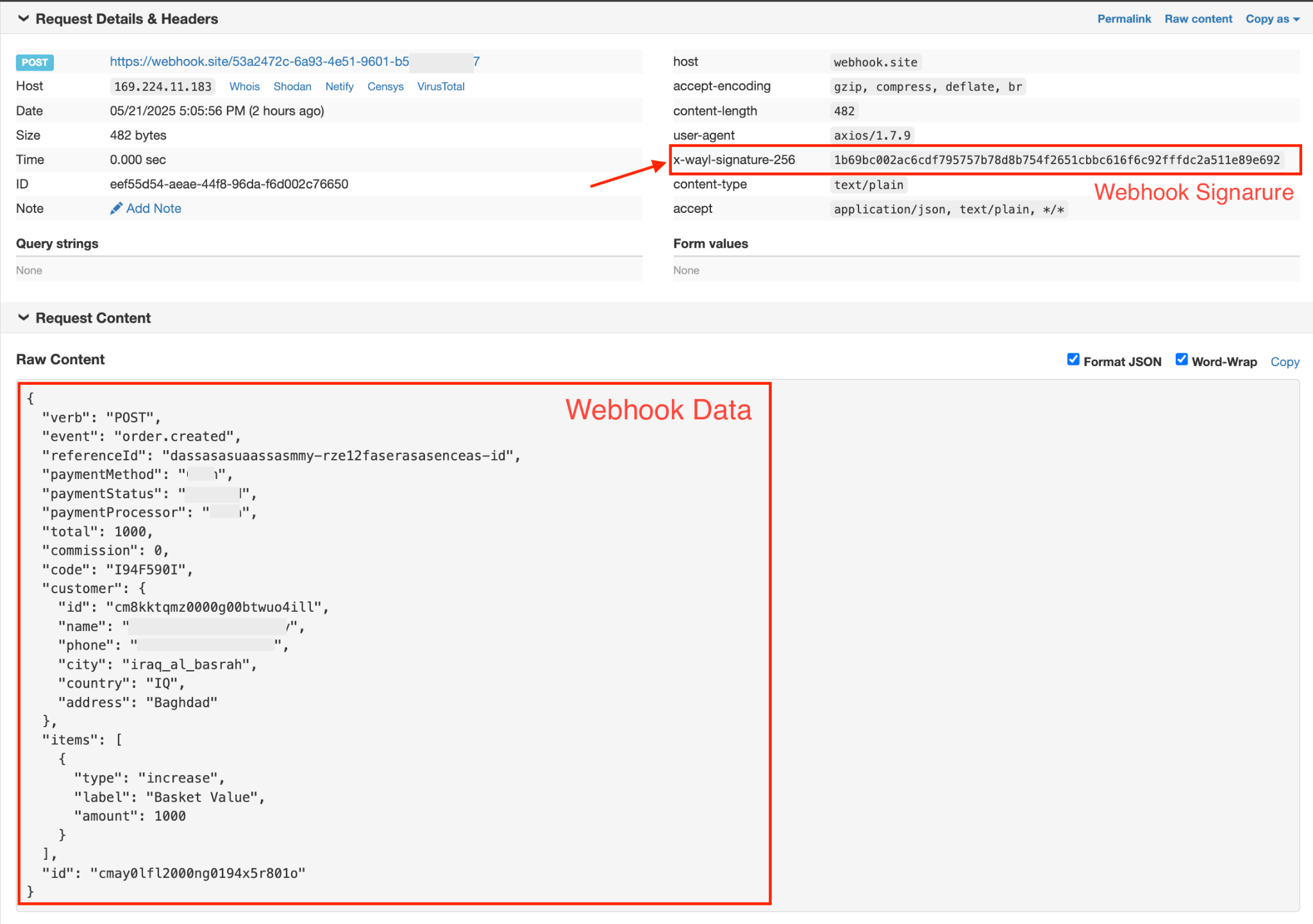
Example body (JSON)
{"verb": "POST","event": "order.created","referenceId": "dassasasuaassasmmy-rzel2faserasaseneas-id","paymentMethod": "...","paymentStatus": "...","paymentProcessor": "...","total": 1000,"commission": 0,"code": "I94F590I","customer": {"id": "cmBkktqmz0000g00btwuo4ill","name": "...","phone": "...","city": "iraq_al_basrah","country": "IQ","address": "Baghdad"},"items": [{"type": "increase","label": "Basket Value","amount": 1000}],"id": "cmay0lf12000ng0194x5r801o"}
Respond
When you've accepted the payload and queued work, reply with any HTTP 2xx status code. If Wayl sees an error or a timeout, it may try again—so keep your endpoint quick (do heavy work in the background) and return success only once you've safely stored the event.
Verify HMAC
Use the same webhookSecret you used when creating the link. Hash the raw body with HMAC-SHA256 and compare the result to the x-wayl-signature-256 header using a constant-time comparison so timing attacks can't leak information.
Node.js
import crypto from "crypto";function verifyWebhookSignature(data, signature, secret) {// data from webhook req.body// signature from req.headers "x-wayl-signature-256"// secret that was previously sent when creating the link, should be locally// stored in your code or database// generate signature from data and secretconst calculatedSignature = crypto.createHmac("sha256", secret).update(data).digest("hex");// Convert the signatures to buffers for securityconst signatureBuffer = Buffer.from(signature, "hex");const calculatedSignatureBuffer = Buffer.from(calculatedSignature, "hex");// Compare the created signature with the signature from the requestif (signatureBuffer.length !== calculatedSignatureBuffer.length) {return false;}return crypto.timingSafeEqual(signatureBuffer, calculatedSignatureBuffer);// true if the signature is valid, false otherwise}verifyWebhookSignature(data, signature, secret);
Sign the exact bytes Wayl posted—typically the buffer or string you read from the request before you call JSON.parse, so whitespace and ordering stay identical.
Step 5
Refunds
When you need to return money to a customer after a successful charge, you open a refund against the same order using POST /api/v1/refunds. You send the order's referenceId, how much to refund in IQD as amount (up to what was captured), and a clear reason (100–1500 characters) so support and risk teams can see why. Wayl tracks each refund with a status such as Requested, Refunded, Rejected, or Cancelled.
Example (curl)
curl -s -X POST "https://api.thewayl.com/api/v1/refunds" \-H "X-WAYL-AUTHENTICATION: YOUR_MERCHANT_TOKEN" \-H "Content-Type: application/json" \-d '{"referenceId": "order-1001","reason": "Customer requested a refund after a duplicate charge. Support ticket #4521 confirms the issue; merchant policy allows a full reversal within fourteen days of purchase.","amount": 10000}'
If the refund request is accepted, you'll get 201 and a data object with the refund's id, linkId, amount, who started it (initiatedBy), and the current status.
Example response (201 · JSON)
{"data": {"id": "cmrefund_01hq_example","reason": "Customer requested a refund after a duplicate charge. Support ticket #4521 confirms the issue; merchant policy allows a full reversal within fourteen days of purchase.","linkId": "cmlink_01hq_example","referenceId": "order-1001","amount": 10000,"initiatedBy": "Merchant","status": "Requested"},"message": "Refund created successfully."}
Listing refunds and cancelling a pending request are documented in the hosted API reference.
Full reference
Schemas, status codes, try-it — on the hosted API docs.